Today we detail consider options for obtaining root access on Karbonn Mobiles A51 Lite. This is done to extend the functionality of Android smartphone or tablet. Site HOW TO ROOT ANDROID PHONE in detail describe how to get root, you only need to read the instructions and see our video.
Showing posts with label How to Root Without PC. Show all posts
Wednesday, 4 January 2017
HOW TO ROOT KARBONN A51 LITE

WHAT IS THE ROOT PRIVILEGES?
This right administrator (root) system. More can be said that it is elevated privileges in the operating system android. With root privileges before you open up almost unlimited possibilities, such as overclocking the processor speed, improved performance, actions automation. Can reduce the Energy consumption (This happens when provided that you will not increase the clock frequency of the processor). A full list of features can be found at special page.
INSTRUCTIONS GET TO ROOT KARBONN MOBILES A51 LITE
Ladies and gentlemen, I ask you to pay attention! If you’ve tried any of these methods, but not our version of the program and not for our instructions, do not write in the comments, that you could not get desired result.
If you have done everything according to the instructions and use the links on our program, but could not get root access, be sure to write in the comments information: your smartphone, Android version, the name of the program error that you receive. Members and the administration of the community HOW TO ROOT ANDROID PHONE will be able to help you, and the more information you provide, the easier it will be to solve the problem! All successful day 
METHOD 1 USING ROOT GENIUS (I RECOMMEND THIS METHOD, AS THE FASTEST AND EASIEST)


- press "Root it" and start the process;

METHOD 2 THROUGH THE REGULAR VERSION KINGO
- download program KingoRoot on computer
- Enable USB debugging on your mobile device

- Install and Kingo run

- Connect your mobile device to a computer via microUSB cable
- Wait a few seconds or a minute, until Kingo see your device

- Tap Root button located in the center and wait for a few minutes

- Wait until the process is completed and the device is reset
METHOD 3 THROUGH ONECLICK KINGO

it is not necessary to take any special action.
Download the version of our kingo oneclick (Download From This ), Set up and press the button oneclickroot. If you have tried before, but you could not, then maybe you do not have that version of the program. Download our version of the program.
Saturday, 20 February 2016
How to Root Letv Le 1s One Pro Without PC
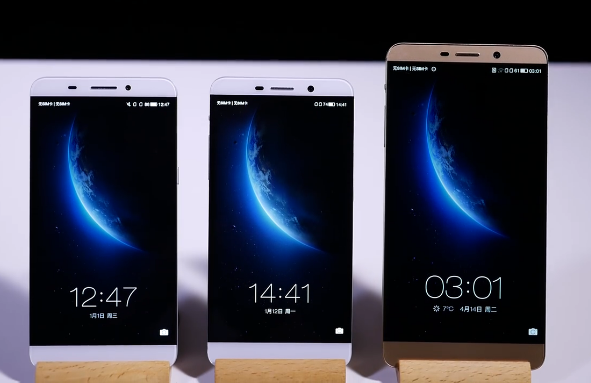
LeTV this time released 3 phones which all called Edge to Edge screen – LeTV Le1 1S /LeTV Le1 Pro X900 / LeTV Le Max to try to build its conceptual ecology. It maybe a very high light for all the Chinese users, however, for all the foreign users who like these phones, we here give you a root letv le 1s tutorial to help you root letv le 1s Add Google Service/Recovery/Root/Remove China Apps on your LeTV Le1 1S .
What is Rooting ?
We love Android in its native form, but rooting your phone can give you the opportunity to do so much more than your phone can do out of the box — speeding it up with overclocking or customising the look of your phone with themes. Here’s what you need to know about the rooting process, and where to find a guide for your phone.
Read through the glossary below to get acquainted with important rooting terminology, then check out the FAQ for more info on your burning questions. When you’re ready, check out the last section for resources on your specific device.
The Letv Le One Pro 1s / Letv Le 1s comes with a 5.5 inch touchscreen display which is powered by a Qualcomm Snapdragon 810 octa-core processor, along with a 3GB RAM and it runs on Android 5.0 lollipop operating system. So you are here because you want to Root Letv One Pro, So lets not waste any further time and just start with Rooting your Letv 1s.
First of all, we need to check about the details of LeTV Le1 1S in case of flashing to a wrong device or how to root letv le 1s .
| GENERAL FEATURES | |
|---|---|
| Brand | Letv |
| Handset Color | Gold |
| Form | Bar |
| SIM Size | Micro SIM and Nano SIM |
| Call Features | Conference Call, Loudspeaker |
| Model Name | Le 1S |
| Touch Screen | Yes |
| Video Calling | Yes |
| SIM Type | Dual Sim, LTE + LTE |
| Model ID | Le X507 |
| In the Box | Handset, USB Type-C Charging Cable, Charging Adapter, Sim Tray Eject Tool, Quick Start Guide |
Rooting an Android device gives you root access or control over the software administrative commands of your smartphone or tablet. Rooting an Android device gives users the ability to make aesthetic changes by installing custom ROMs (modified versions of Android OS) and overcome the limitations placed on a device by phone carriers, such as pre-loaded apps. Tweaking the OS on your device to fit your needs can free up memory space, optimize your phone’s speed and possibly save battery life.

How to Root Letv Le 1S phone :
- Download the rooting package to your phone. Once done, install the kingroot.apk on your device.
Click Here To Download Kingroot.apk From Uploaded.net
- Next, open the app. Click “Try Root” or “Start Root”
- It will take some time to root the phone.
- Finish and Reboot your phone!.
- You have now succesfully Rooted your Letv Le 1s . Check out for an application in your application drawer with the name as KingUser. This is the proof of a rooted device.
How to remove China Apps from letv le 1s
Root letv le 1s after reading this Notice:
1. Phone Power over 40%.
2. Computer better Win XP/Win 7.
3. Backup your data.
4. Read the guide first before you do it.
5. Take your own risk.
The Whole Steps :
1. We need to flash a Third-party Recovery.
2. We need to update the Root.zip.
3. We need to update the Google.zip.
Flash The Third-party Recovery:
1. Open the usb debugging on your phone, and connect the phone to the pc to get the phone driver.
2. Un-rar the “LeTV-Le-1-X600-TWRP-Recovery-2.8.6.0.rar“, and double click recovery.cmd.
3. Follow the tips on the cmd window.
4. The phone will auto enter the recovery model when it is finished flash.
Recovery Details:
I also uploaded an Original card flash rom here(LETV1-5.0.005E.zip), if you do something wrong, you can use this one to restore.
Update the Root.zip:
1. Send the “BETA-SuperSU-v2.49.zip” to your phone storage.
2. Power off the phone first, wait for 5 seconds.
3. Long press volume up button first and then press power on to enter the recovery.
4. Follow the details of “Recovery Details” above to find the “BETA-SuperSU-v2.49.zip” to update.
Update the Google Service.zip:
1. Send the “gapps-lp-20141107-signed.zip” to your phone storage.
2. Power off the phone first, wait for 5 seconds.
3. Long press volume up button first and then press power on to enter the recovery.
4. Follow the details of “Recovery Details” above to find the “gapps-lp-20141107-signed.zip” to update.
Google Service P.S:
I can’t test the connection of the Google Apps because it is limited in China, if any one tried and find out it does not work, you can:
1. Reflash the rom i uploaded, and do not flash the Google Service.
2. Comment me that it doesn’t work, i will try to find it another way.
Files Download:
Sorry, only those who have replied to this post could see the hidden contents.
All is done. If you have any questions, please comment me, i will reply you as soon as possible. Please read the guide first, and then try.
Subscribe to:
Posts
(
Atom
)